FXhome Help Center Help Center home page Help Center
Back to FXhome.com
  1. FXhome Help Center
  2. HitFilm and Imerge
  3. HitFilm Troubleshooting

Search

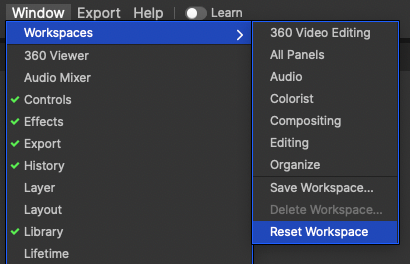
I clicked float container. How do I reset my workspace?

To reset your workspace back to how it was when you first opened the program, simply navigate to Window > Workspaces > Reset Workspace.
 

Updated December 21, 2022 10:35

Have more questions? Submit a request

Want to contact support? Chat with us now

Was this article helpful?

3 out of 6 found this helpful

Articles in this section

  • My software is crashing. Do you have any troubleshooting tips?
  • Do you have tutorials for your software?
  • Can I change the language of my software?
  • How do I remove the watermark?
  • Where are the add-ons?
  • Do I have to have an internet connection to use the software?
  • Where can I find LUTs?
  • The effect says [Layer only], what does that mean?
  • How do I change the video quality in the viewer?
  • Can I run HitFilm on 32-bit system?

See all articles

Contact us